Posts

Showing posts with the label SQL Server Tips

Azure SQL, Cloud Migration and Modernization
Image
  What is Azure SQL? Azure SQL is a family of managed, secure, and intelligent products that use the SQL Server database engine in the Azure cloud. Azure SQL Database: Support modern cloud applications on an intelligent, managed database service, that includes serverless compute. Azure SQL Managed Instance : Modernize your existing SQL Server applications at scale with an intelligent fully managed instance as a service, with almost 100% feature parity with the SQL Server database engine. Best for most migrations to the cloud. SQL Server on Azure VMs: Lift-and-shift your SQL Server workloads with ease and maintain 100% SQL Server compatibility and operating system-level access. Azure SQL is built upon the familiar SQL Server engine, so you can migrate applications with ease and continue to use the tools, languages, and resources you're familiar with. Your skills and experience transfer to the cloud, so you can do even more with what you already have. What do you want to do? Suppor...

How to set SQL Server connection string in ASP.Net?

Firstly;  .NET DataProvider -- Standard Connection with username and password: Put this at the top of your code: using System.Data.SqlClient; Put this  in your code body: SqlConnection conn = new SqlConnection(); conn.ConnectionString = "Data Source=ServerName;" + "Initial Catalog=DataBaseName;" + "User id=UserName;" + "Password=UserPassword;"; conn.Open(); Secondly;  .NET DataProvider -- Trusted Connection: Put this at the top of your code: using System.Data.SqlClient; Put this  in your code body: SqlConnection conn = new SqlConnection(); conn.ConnectionString = "Data Source=ServerName;" + "Initial Catalog=DataBaseName;" + "Integrated Security=SSPI;"; conn.Open(); Thirdly; .NET Configuration manager (Web configuration); Put this at the top of your code: using System.Web.Configuration; using System.Data.SqlClient; Put this in Web.Config: <connectionStrings > <add name="myCo...

How to change SQL Server Authentication Mode by using TSQL Query

SQL Server Authentication mode can be changed by using GUI. Simply click on Server -> Properties -> Security. There you can change the SQL Server Authentication mode to 1. Windows Authentication mode 2. SQL Server and Windows Authentication mode( Mixed Mode) You can also use below scripts to check and change the SQL Server Authentication mode: --Use this to Check the SQL Server Authentication Mode SELECT CASE SERVERPROPERTY('IsIntegratedSecurityOnly')  WHEN 1 THEN 'Windows Authentication'  WHEN 0 THEN 'Windows and SQL Server Authentication'  END as [SQLServerAuthenticationMode] ------------------------------------------------------------------------------ --To Change to Windows Authentication USE [master] GO EXEC xp_instance_regwrite N'HKEY_LOCAL_MACHINE', N'Software\Microsoft\MSSQLServer\MSSQLServer', N'LoginMode', REG_DWORD, 1 GO -----------------------------------------------------------------------------...

How to backup multiple SQL Server Databases in SQL Server

Example: You need to take backup of multiple databases from SQL Server Instance and be created with date_time. Below is a script you can use(Cursor); USE MASTER GO DECLARE @BackupPath varchar(100) --Provide the backup path SET @BackupPath = 'C:\Backup\' DECLARE @DBName AS varchar(200) DECLARE Cur CURSOR FOR --Change the select query for the DBs you like to backup SELECT  name FROM    sys.databases WHERE   database_id >4  --(i.e excluding the following 'master, tempdb, model and msdb') OPEN Cur FETCH NEXT FROM Cur INTO @DBName WHILE @@FETCH_STATUS = 0 BEGIN   DECLARE @SQL varchar(max) = NULL   DECLARE @DBNamewithDateTime varchar(128) = NULL   SET @DBNamewithDateTime = @DBName + '_' + REPLACE(CAST(GETDATE()        AS date), '-', '') + '_' + REPLACE(CAST(CAST(GETDATE() AS time)        AS char(8)), ':', '')   SET @SQL = 'BACKUP DATABASE [' + @DBName + '] TO  DISK = N''' ...

How to get the last day of any month

Image
Example: You are on a project and you need to automate how you retrieve the last day of the month every time you pull data because you use it almost all the time. This is a quick solution, by using a Scalar-valued function. Run this: USE YourDBName GO Create Function [dbo].[FnGetLastDayOfMonth] -- Input parameters ( @Anydate datetime ) RETURNS datetime AS /******************************************************************** Returns the last day of the month (extracted from the date passed) *********************************************************************/ BEGIN -- add one month to the datepassed SET @Anydate = DATEADD(m,1,@Anydate) RETURN DATEADD(d,-datepart(d,@Anydate),@Anydate) END You can test this in a simple select statement;  SELECT [dbo].[fnGetLastDayOfMonth](GETDATE()) as  LastDayOfTheMonth Here is the result when i ran it;

How to Get Row Count Of All The Tables In SQL Server Database

Image
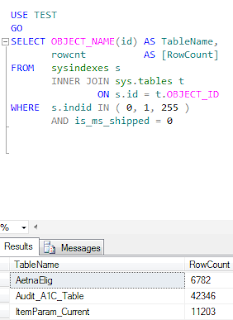
Example:   Need to do a quick  row count for all the tables in a database . This is a quick way to find the row count for all the tables in a database. The Cursor with Count(*) can be slow as it has to count rows for each of the table. USE YourDBName GO SELECT OBJECT_NAME ( id ) AS TableName ,        rowcnt           AS [RowCount] FROM   sysindexes s        INNER JOIN sys.tables t                ON s.id = t. OBJECT_ID WHERE   s.indid IN ( 0 , 1 , 255 )        AND is_ms_shipped = 0 I ran above query on Test DB and got below information: Fig 1: Get Row Count for all the Tables in SQL Server Database                             ...

What's New in SQL Server 2016

  Check this out. Below is the summary of SQL Server 2016 new features.  1          Query Store a)      It contains query work load history . b)      It can enforce polices to direct SQL Server Query processor to execute in a specific     manner c)         Captures queries, query plans, runtime statistics, etc. d)        New system views are added to support Query store e)         Helps system-wide or database level performance analysis and troubleshooting 2        Column Store a)         Column store index on your in-memory table for higher throughput b)       Columnstore indexes achieve up to 10x greater data compression than row store indexes. This greatly reduces the IO required to execute analytic...

Quick and easy way to get list of all the tables with all the columns and columns demographic from SQL Server Databases on SQL Server Instance

Example: Working on a project and needed to get list of all the tables from all the databases with columns and columns demographic. This information can be needed for many reasons. The below script uses cursor to loop through all the databases to get the list of tables with columns. I have ignored the system databases such as master, model, msdb and tempdb. You can filter the databases on which you would like to run the query. ________________________________________________________ USE Master GO --Declare Variables DECLARE @DatabaseName AS VARCHAR(500) --Create Temp Table to Save your Results IF OBJECT_ID('tempdb..#Results') IS NOT NULL     DROP TABLE #Results CREATE TABLE #Results (     ServerName VARCHAR(150)     ,DatabaseName VARCHAR(150)     ,SchemaName VARCHAR(150)     ,TableName VARCHAR(150)     ,ColumnName VARCHAR(150)      ,Data_Type VARCHAR(150)    ,Is_Nullable VARCH...